
What is aggregation?
Aggregation computes summary values on parent issues based on their children. When a parent issue has child issues in the hierarchy, the app collects data from all descendants and stores the result on the parent. The tree view then displays these values in aggregated columns.
Aggregation is event-driven — it recalculates automatically whenever a child issue is created, updated, or deleted, and whenever the parent-child relationship changes.
The app supports two kinds of aggregation:
- General aggregators — Automatically available for any field whose schema type matches a supported category. Select the field and the app handles the computation.
- Custom aggregators — Write your own computation logic using Jira Expressions. The app ships with two built-in custom aggregators: Progress and Pending Team.
General aggregators
General aggregators work by field type. Any Jira field whose schema matches a supported type can be aggregated — just add it to a hierarchy and the app computes the value automatically.
Supported field types
| Field schema type | Aggregation behavior | Example fields |
|---|---|---|
string / option | Collects unique values from all children | Text fields, select lists |
array of string / option | Collects unique values across children’s arrays | Labels, Components, multi-select |
statusCategory | Reduces children’s status categories to a single summary | Jira Status |
project | Collects unique project references from children | Project picker fields |
Team (atlassian-team) | Collects unique team members from children | Atlassian Team custom field |
Note
The field dropdown only shows fields whose schema type matches one of the supported types above. General aggregators require no configuration beyond selecting the field.
Adding a general aggregated field

- Go to the admin page and click Edit Levels on a hierarchy
- Scroll to the Aggregated Fields section below the levels table
- Click + Add Field
- Select a field from the dropdown
- Click Save
A field can only be aggregated in one hierarchy at a time. If a field is already used in another hierarchy, it won’t appear in the dropdown.
Custom aggregators
Custom aggregators let you define your own computation logic using Jira Expressions. Unlike general aggregators which apply automatically to fields of a matching type, custom aggregators run a Jira Expression you write against the parent issue and all its descendants.
Built-in custom aggregators
The app ships with two read-only custom aggregators:
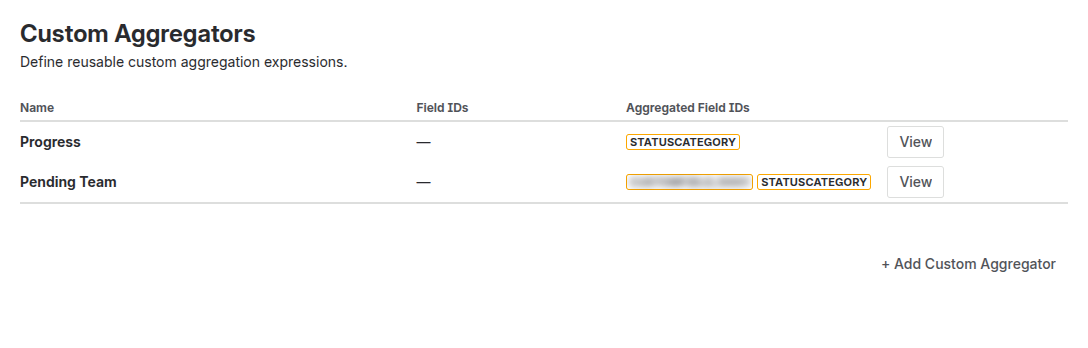
Progress
Shows a color-coded progress bar based on the status categories of child issues:
- Blue — To Do
- Yellow — In Progress
- Green — Done
The bar width represents the proportion of issues in each category. Hover over the bar to see exact counts.
How it works: Progress depends on the statusCategory general aggregator. After the status category is aggregated for all children, the Progress expression counts how many children fall into each category.
Pending Team
Displays avatars of team members assigned to child issues that are not yet done. When all child issues are completed, the field shows empty.
How it works: Pending Team depends on both a Team field and the statusCategory general aggregator. It filters out team members whose child issues are in the “Done” category.
Assigning built-in aggregators
To use Progress or Pending Team:
- In the levels editor for a hierarchy, add the required general aggregated fields first (e.g.
statusCategoryfor Progress) - Scroll to the Custom Aggregators section
- Click + Add and select Progress or Pending Team from the list
- Click Save
Creating your own custom aggregator
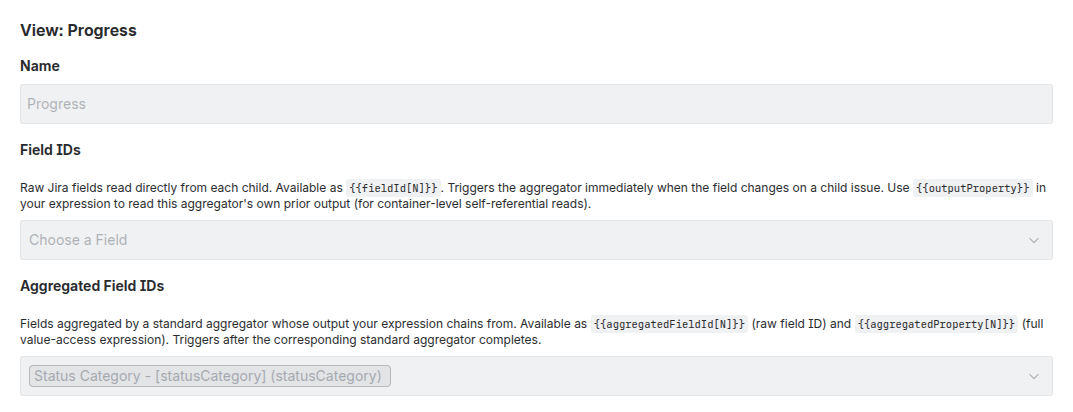
- Go to the admin page, scroll to the Custom Aggregators section
- Click + Add Custom Aggregator
- Fill in the definition:
| Property | Description |
|---|---|
| Name | Human-readable label shown in the tree view |
| Display Type | How the result renders in the tree (progress, team, user, number, etc.) |
| Expression | A Jira Expression using issues.reduce(...) to compute a value from children |
| Field Dependencies | Jira field IDs that trigger recalculation when changed on any child |
| Aggregated Dependencies | General aggregated field IDs whose output is chained into this expression |
| Index Path | (Optional) A JSON path within the result to expose for JQL searching |
| Index Type | (Optional) The Jira property value type for the indexed path |
Expression syntax
Custom aggregator expressions use the Jira Expression language. The expression receives:
issue— the parent issue being computedissues— an array of all descendant issues
Use issues.reduce(...) to iterate over children and accumulate a result:
// Example: count children by priority
issues.reduce((r, child) => {
  let p = child.priority?.name ?? 'None';
  return r.set(p, (r[p] || 0) + 1);
}, new Map())
Aggregated dependencies
If your expression needs the output of a general aggregated field, list it in Aggregated Dependencies. The custom aggregator runs after the general aggregator completes, and its result is available via {{aggregatedProperty[N]}} in your expression, where N is the zero-based index in the dependencies list.
For example, the built-in Progress aggregator lists statusCategory as an aggregated dependency, then references it as {{aggregatedProperty[0]}} in its expression.
Assigning to hierarchies
After creating a custom aggregator, assign it to one or more hierarchies:
- In the levels editor for a hierarchy, scroll to Custom Aggregators
- Click + Add and select from your defined aggregators
- Click Save
A custom aggregator can be assigned to multiple hierarchies.
Display types
The displayType property controls how an aggregated value renders in the tree view:
| Display Type | Rendering |
|---|---|
progress | Color-coded progress bar |
team | Avatar group of team members |
user | Single user avatar |
number | Numeric value |
date | Formatted date |
project | Project name/key |
statusCategory | Status category lozenge |
If no display type is specified, the value renders as generic text.
Next steps
- JQL Queries — Search issues by hierarchy position
- Administration — Trigger a sync to recompute all aggregated values